CSCA REGISTRATION
CSCA Registration: A Step-by-Step Guide
Prepare your passport and photo, create an official CSCA account, choose your session and subjects, then review and pay.
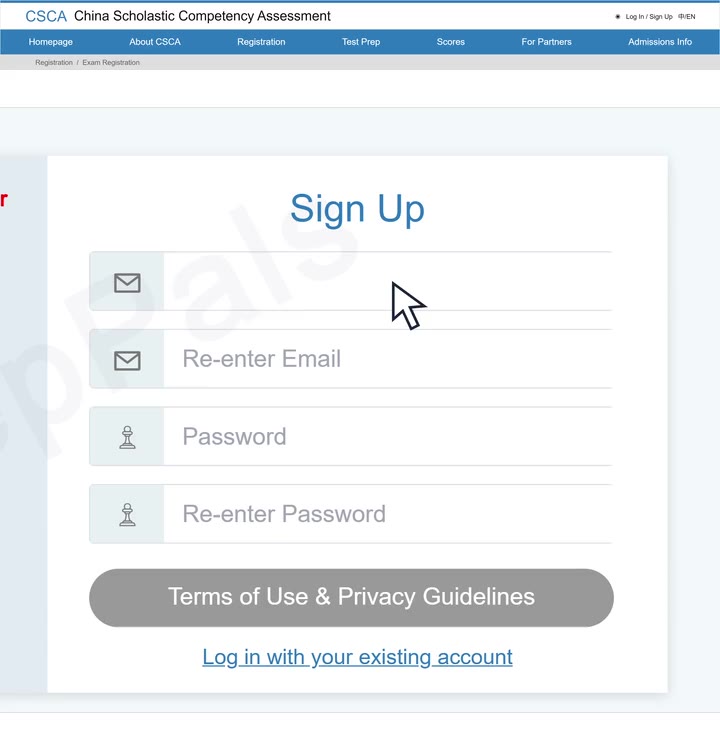
Step 1 of 6Create your account

CSCA registration dates & fees
14–15
November 2026
Next published exam
Beijing Time (UTC+8)
- Registration opens
- Registration deadline
Registration fees
- 1 subject
- RMB450
- 2 or more subjects
- RMB700
Total fee for your registration
Watch the CSCA registration video
A 97-second walkthrough. Press play, then follow along at your own pace.
Video chapters
Choose a step to start there.
Your CSCA registration checklist
Have these four essentials ready before you start.
0/4 prepared
CSCA passport requirements
- Valid until results are released
- Sign the signature page, if present
- Bring the same original on exam day
CSCA photo requirements
JPG / JPEG
40–200 KB
- Taken within 6 months
- White background
- Face forward · Ears & eyebrows visible
Six steps. One registration.
Follow the CSCA registration process, from account to confirmation.
- 1
Create an account or sign in
Create a CSCA account with your personal email, or sign in to your existing account.
Use the same personal email twice.Set your password and read the terms. - 2
Choose your exam session
Choose the date, location and format. Make sure the session fits your university application deadline.
Choose date, region, city and format.Check the choices, then Next. - 3
Add your passport details and photo
Copy your passport details and upload your ID photo. Complete any additional document requests shown in your account.
Match your passport details.Upload your compliant ID photo. - 4
Choose your subjects and test language
Choose the subjects, test language and Professional Chinese track required by your university and programme.
Check your Professional Chinese track.Choose the subject and test language. - 5
Review your registration and pay
Check your details, session, subjects and fee. Choose an available payment method and pay through CSCA.
Check details, session and subjects.Check the fee and method, then Pay. - 6
Confirm and save your registration
Open My Registration. Check the registration and payment status, then save your record.
My CSCA → My Registration.Check status and save your record.
Ready to register?
Your documents, your subjects, your official account.
After registration: your next steps
Save your record
Keep the registration and payment confirmation.
Check your ticket
Watch your account for the ticket and exam instructions.
Start your prep
Use your subjects and exam date to plan your study.
Prepare for CSCA with PrepPals
Choose your next study step.
PREPPALS STUDY COMMUNITY
Prepare alongside other CSCA students
Study questions, shared resources and other CSCA students. Prepare with pals.
Join the study group
Know the syllabus
Know exactly what your subjects cover.
Explore the CSCA syllabusLearn with PrepPals
Live online classes, guided practice and teacher feedback.
Explore CSCA tutoringPractice resources by subject
Plan around my exam date
Want a suggested timeline? Add your confirmed exam date, subjects and current study stage.
CSCA registration FAQs
Getting registered
Where do I officially register for the CSCA?
Register for the CSCA through the official CSCA website at csca.cn.
The official platform is used to create your account, choose an available exam session, complete your candidate information, select your subjects and complete registration. PrepPals does not process official CSCA registrations.
When does the next CSCA registration open?
Registration for the 14–15 November 2026 CSCA session is scheduled for 15–21 October 2026, Beijing Time.
Registration windows are short and can change between sessions, so check the official CSCA website before registering.
Last verified: .
What do I need for CSCA registration?
Prepare your valid ordinary passport, a compliant digital ID photo, your target university and programme information, and a payment method supported by the live CSCA registration system.
You should also confirm which CSCA subjects and test language your intended university requires before you pay.
Documents & fees
Can I register for the CSCA with an ID card instead of a passport?
No. The current CSCA identification rules require an original valid ordinary booklet passport.
National ID cards, student cards, residence permits, passport cards, digital documents, scans and photocopies do not replace the required passport for identity verification.
What are the CSCA photo requirements?
The current official specification is 33 × 48 mm, JPG or JPEG, 40–200 KB, with a plain white background.
Use a recent colour ID photo taken within the last six months. The official rules prohibit AI-generated, face-swapped or heavily altered photos.
How much does CSCA registration cost?
The currently published CSCA registration fee is RMB 450 for one subject and RMB 700 for two or more subjects.
Check the amount shown in the official registration system before paying in case the fee policy changes.
Subjects & special cases
Which CSCA subjects should I register for?
Your CSCA subject combination should follow the current requirements of your target university and undergraduate programme.
Do not choose subjects only from a general online guide. Check the university’s current admission requirements before completing payment.
What if my passport changes after I register?
If your passport is lost, replaced or its information changes after registration, request a correction through the official designated process before your admission ticket is generated.
Submit a clear copy of the new passport information page, plus the old information page for a replacement or an official police report for a lost passport.
Can I take the CSCA online?
CSCA has used multiple examination formats, including home-based online testing and authorised test-centre formats.
The available format depends on the specific exam session and location, so check the options shown in the live registration system before choosing.